Intro
I'd like to introduce an app called jump desktop. The reason is that I'm using it very well. First of all, I'll give someone who live in other region a small tip before the start. It's 22,000 KRW if you buy it in Korea, but what if you buy it in dollars? It's 15 USD. It means that if you buy it in dollars, it was around 18,000 KRW. So before a purchase, compare curreny and price between your country and the United States. In my case, a cup of americano is discounted enough to drink. Anyway, in this post, I'll find out how to use it and what to be careful of before purchase this app.
Let's connect the iPad to the desktop 1
Jump Desktop is just as it's name, connects any iPad(if supported) and desktop remotely. Of course, you can connect it with an iPhone, but isn't the screen too small? Anyway, it's also possible if you want. But you can use it like a real laptop from iPad. If you use a Bluetooth mouse and a Bluetooth keyboard (of course wired one also okay to use), it really becomes a laptop. For your information, you can also turn on or off the desktop screen that is far away from the iPad.
Let's connect the iPad to the desktop 2
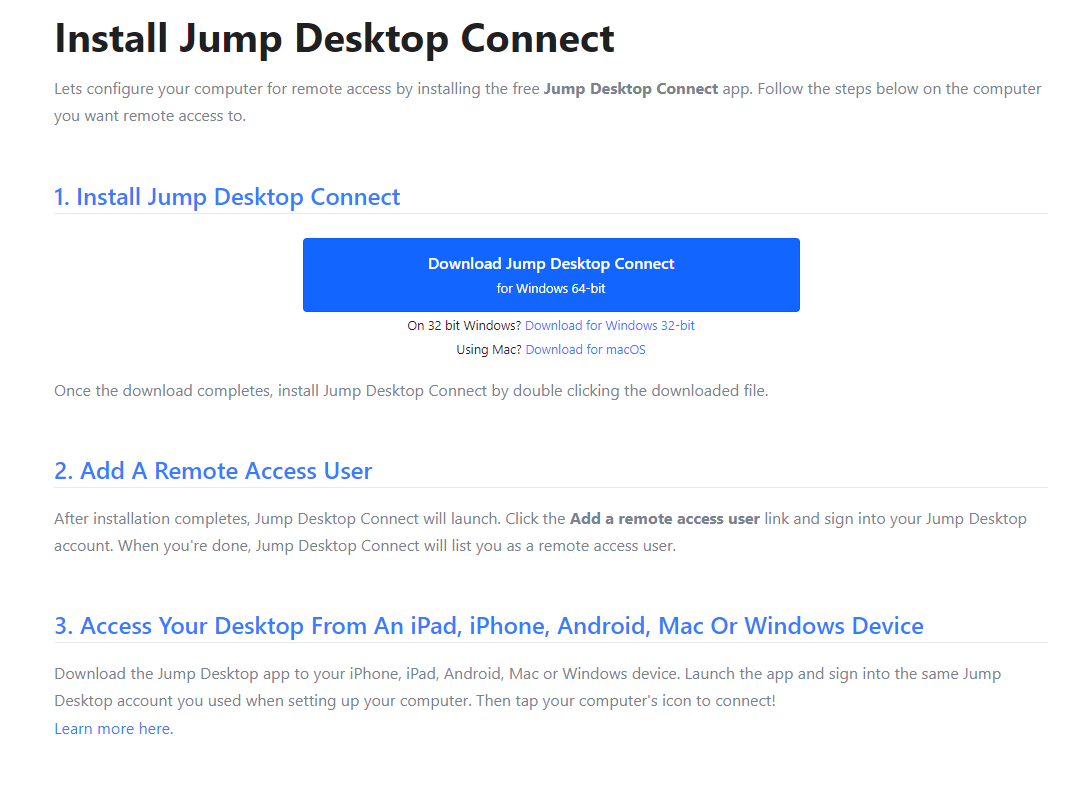
First to first you should purchase this application. And after that, you shoud visit this site( https://jumpdesktop.com/connect/) to download this application for Connect, on your desktop. What you need to know, isn't the iPad the controller? (You can't control the iPad with your desktop.) Then you can just buy the app. and they can download the app for free from the official website and link it to your iPad account. Then, he's the only one who needs to buy the app. You can download the app from the official website for free for each desktop you want to control, and then link it to your iPad account.
Thing to know Jump desktop 1 (Can I play games by any chance?)
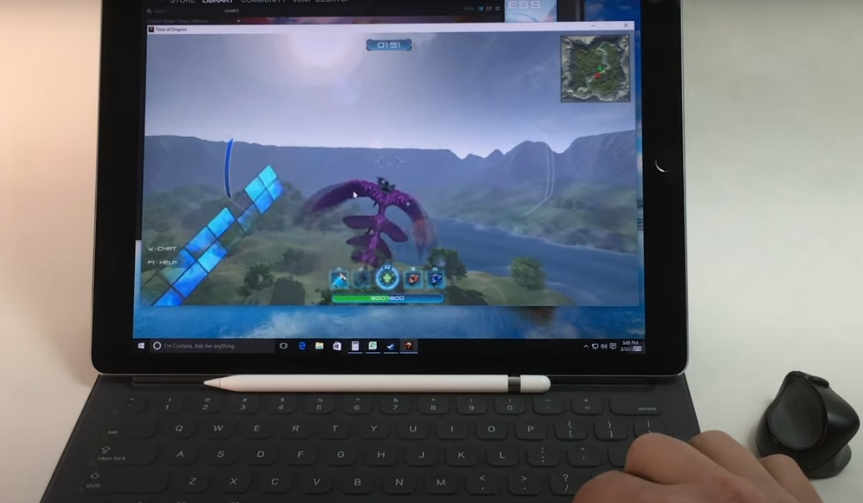
I'd like to know the answer to the question, "Can I play games on my desktop?" No, you won't even get these questions. Because when the mouse is connected, keyboard is recognized, and screen is turned on, what's the problem? You might expect just a delay. To put it in advance, no. If you go to the site above, you'll watch a video with someone who can play a game. But what you need to know is that computer don't detect mice which is connected on your ipad well. If you play something like Maple Story which changes the viewpoint well by yourself, you can probably use it without any difficulty. Just a little delay as mentioned above. But in my experience, it's not working on FPS games including Valorant. Eurotruck Simuilator? No. The mouse goes back to itself and the viewpoint doesn't move. I don't know why. I really don't know. "Can't the viewpoint be used when the mouse is recognized up, down, left, right?" You might wonder. I also thought the same way. But as a result, something seems to be colliding with something related to mouse detection.
Thing to know Jump desktop 2

This is natural, but I want to tell you something that only those who bought it can know. As mentioned above, the application needs to be turned on on not only the iPad but also the desktop to be remote. If you notice what the premise is, you are a genius. That's right. The desktop needs to be turned on right away! One of My friends who majoring in Computer Science can control the IP or something and turn on and off the computer remotely, but I don't know how to do that. I think using IoT device to press on/off button physically, but actually I gave up. Because I think it'll be more annoying to make it. Anyway, the computer needs to be turned on. This means that you have to be in the minimum power saving mode to turn it off. Of course, you can use the iPad to turn it off remotely, so you can press turn it off from the window at that time. But? If you turn it off completely, you won't be able to turn it back on until you face the desktop. Anyway, I'll wrap it up today. I hope someday the day will come when I turn on the desktop remotely.
'IT, Digital' 카테고리의 다른 글
| Prepare DSA test in python (1) Linear list and Linked list (2) | 2025.06.07 |
|---|---|
| Blog AdSense Revenue Journey: How to fix the ads.txt issue in Adsense? (0) | 2025.06.02 |
| [MySQL] SQL SELF JOIN & DATE type format (0) | 2025.05.31 |
| [MySQL] What is SELF JOIN? (0) | 2025.05.30 |
| [MySQL] How to handle decimal points (0) | 2025.05.29 |